
For translators

Glossaries in. Files converted. Terminology.

A desktop toolkit for professional translators. Fifteen processing modes, split into three AI-powered tools and twelve that run entirely on your Mac. No account needed for the local ones.

Fifteen modes · AI and local
LinguaAI Terminology home screen with the AI and Toolkit halves
Two halves from one home screen. AI extracts terminology and style guides; Toolkit converts and processes files locally.

Local first

Twelve of the fifteen never touch the internet.

The Toolkit side converts, splits, merges and rebuilds files entirely on your Mac, with no API calls and no account. The three AI modes run on your own keys with Claude, GPT, Mistral, Gemini, Perplexity, Apple Intelligence or Ollama for local models, and those keys are stored in your Mac's Keychain.

How privacy works →

Three AI modes.

Terminology extraction, style guides and OCR, each running on the model you pick.

01 — TM Glossary Extraction

Mine a memory for its terms.

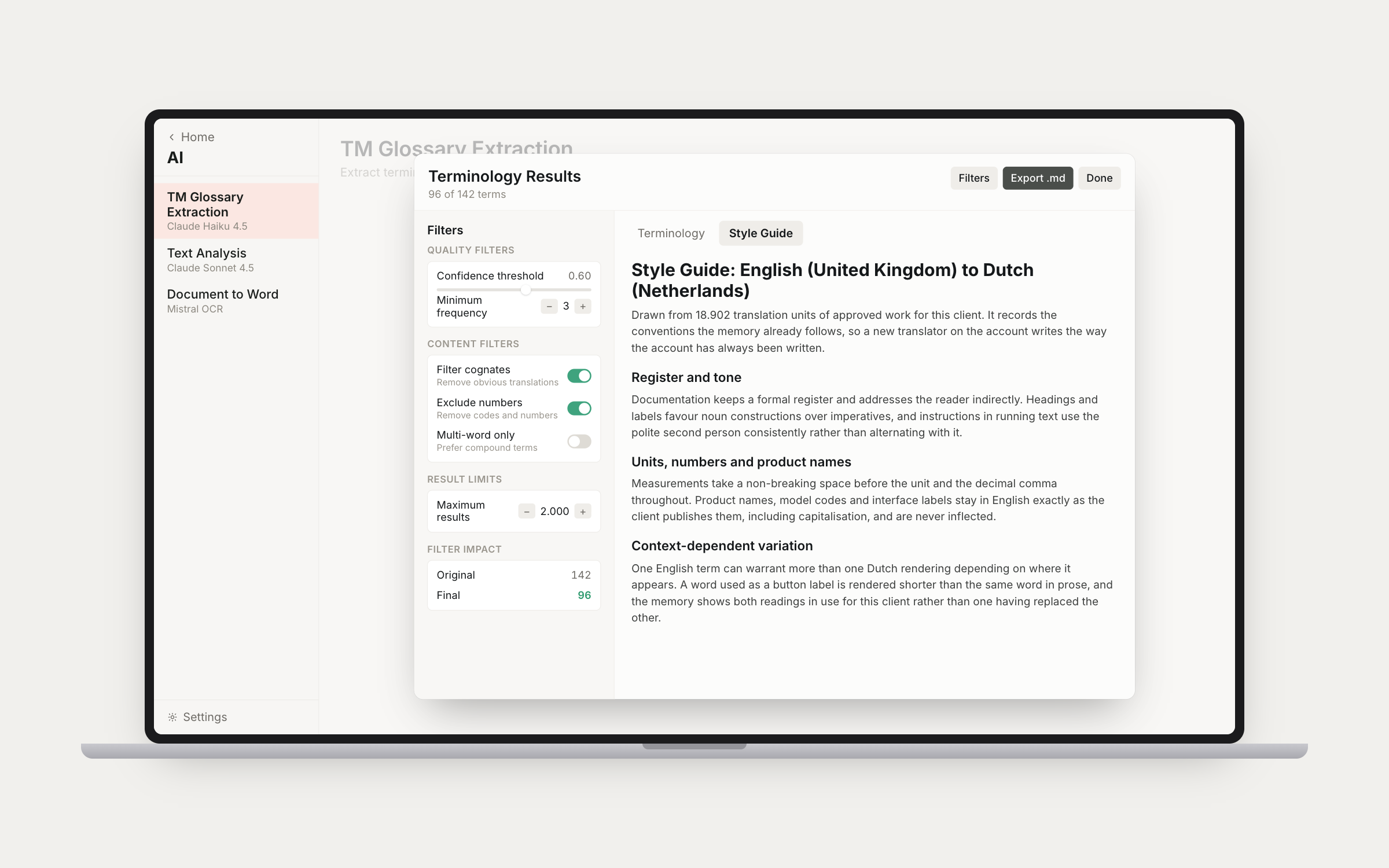
Extract terminology from translation memories (.tmx, .xml) with AI. Two modes: Glossary + Style Guide, or Style Guide Only. Outputs source and target term pairs with confidence scores, frequency counts, definitions and domain classification; the style guide arrives as categories, guidelines and examples. Quality and content filters — confidence threshold, minimum frequency, cognate filtering, exclude numbers and codes, prefer multi-word terms — narrow the list before you read it, and the filter impact panel shows what each one cost.
TM Glossary Extraction results with filters and an extracted style guide
02

Text analysis.

Create glossaries or style guides from source documents (.docx, .doc, .pdf, .txt). Two modes: Create Glossary or Extract Style Guide. Multi-file support with a primary file plus an optional secondary, which can also be .xlsx, .csv or .tbx, and an existing glossary can be folded in to sharpen the result.

03

Document to Word.

Convert PDFs and scanned images (.pdf, .png, .jpg, .tiff) to Word using Mistral OCR. It works from reading order rather than pixel position, so what comes out is a document you can translate, not a picture of one. Output is .docx, ready for translation.

Results arrive in an interactive view with search, sort, filter and per-term editing, split across Terminology and Style Guide tabs, and export to Excel or Markdown with a generation metadata footer. Prompts, batch size and result limits are configurable per mode.

Twelve local modes.

File conversion and translation-memory surgery, all of it on your Mac with no API calls.

04

Word conversion.

.docx to XLIFF and back. Sentence-level segmentation that knows Dutch and English abbreviations, preserving bold, italic and underline, tables, lists, headers, footers and footnotes. The original document is embedded in the XLIFF, so the .xlf is all you need to rebuild, and auto-generated content — tables of contents, page numbers, cross-references — is excluded from translation. The space between sentences belongs to the document, not the translator: the rebuild puts it back the way Trados does, so a hand-typed target missing its trailing space can never fuse two sentences in the delivered file. Symbol-font content, the private-use characters Word uses for instrument readouts and Wingdings bullets, becomes an untouchable placeholder rather than unreadable text.

05

Excel conversion.

.xlsx to XLIFF and back, cell by cell, with a shared string used in many cells translated once and applied everywhere. Numbers, dates, formulas and booleans are left alone. Revision mode handles two-column sheets: pick the source and translation columns and each row becomes a segment with the existing translation pre-filled and unconfirmed, so reviewing is confirming and progress shows how much has been reviewed. Rebuild writes back into the translation column only, in-cell bold and italic runs included.

06

Subtitle conversion.

.srt to XLIFF and back, one cue per segment, with the line breaks inside a cue carried as tags rather than raw newlines so they survive the round trip and cannot be lost by accident. Timings and cue numbering are never touched, so the rebuilt .srt drops straight back into the video workflow. Pairs with LinguaTrans's per-line character limits.

07

XML conversion.

Prepare tbwint.xml for translation, and merge the translated XLIFF back into the original XML.

08

Trados packages.

Unpack .sdlppx without Trados installed: sdlxliff files extracted, embedded TMs converted to TMX, the integrated termbase exported. Repack builds the .sdlrpx return package from your translated files. Packages with inline locked content convert and round-trip like any other, so these jobs no longer need Trados at all.

09

memoQ packages.

Unpack .mqxlz to its bilingual mqxliff, renamed after the package so it stays identifiable in a file list. Repack rebuilds the delivery from the original, swapping in only the translated file so the skeleton and everything else the client sent travels back untouched. Reports the language pair and segment counts on unpack, and points out when every segment arrived confirmed, the sign of a review or post-editing job.

10

Wordfast packages.

Unpack .glp to the TXLF files inside it, and repack the return package from your translated ones, without Wordfast installed. The same round trip as the Trados and memoQ modes, so a Wordfast job arrives as just another folder of bilingual files as far as the rest of the suite is concerned.

11

TM to TMX.

Convert Trados .sdltm translation memories to standard TMX for use in any CAT tool.

12

TMX merge.

Merge multiple TMX files into one, with translation-unit counting per file and skipped files reported.

13 — TM Variant Split

One TM, three Englishes.

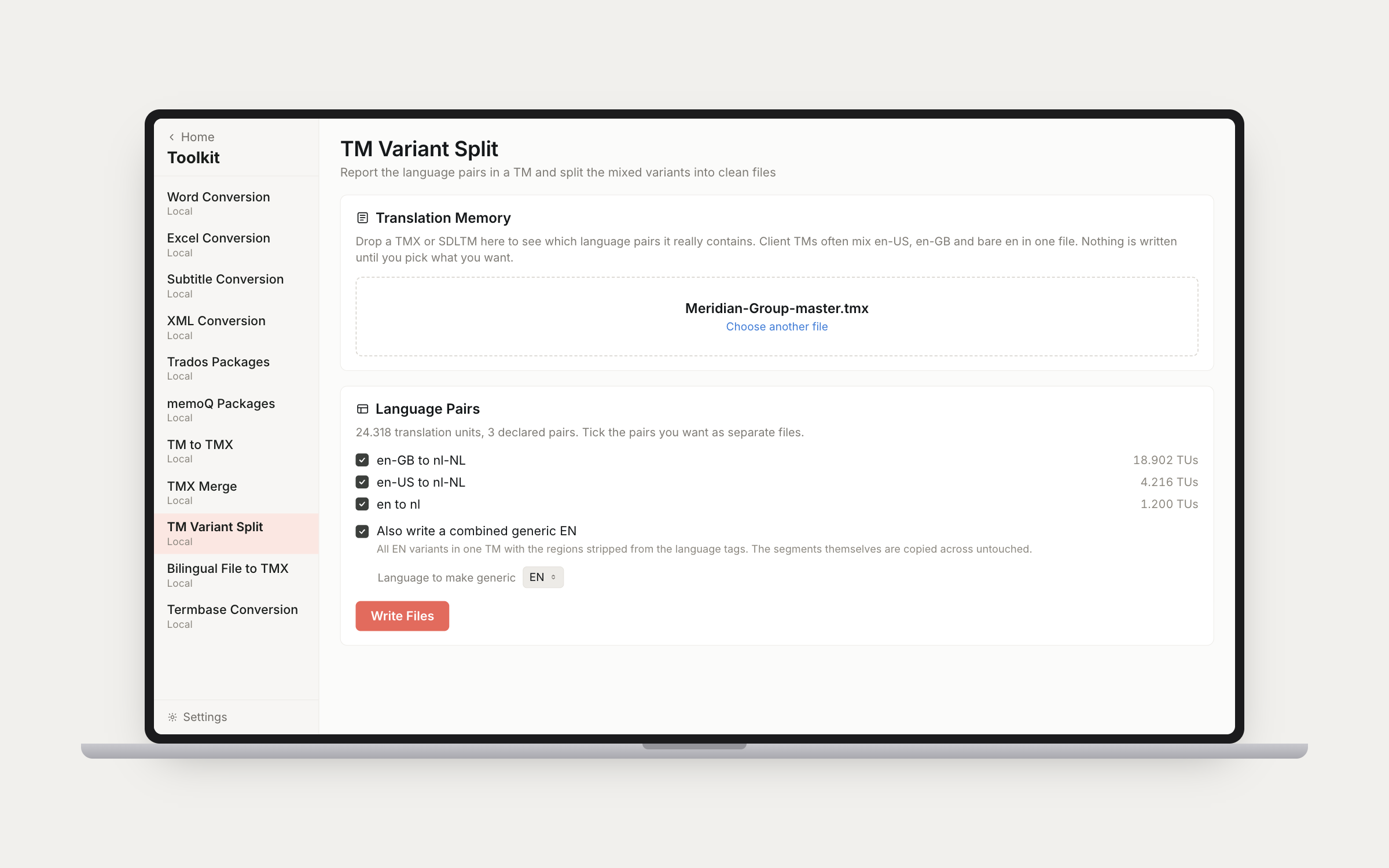
Client TMs routinely mix en-US, en-GB and bare en in one file. The first pass only looks: it lists every declared pair with its unit count, so you can see the shape of a TM before deciding anything, and nothing is written until you tick the pairs you want. The second pass writes one TMX per ticked pair with every translation unit copied out verbatim — inline tags, entities, formatting, whitespace, creation dates and user IDs all arrive exactly as they left, and only the header and the language tags are rewritten. It can also write a combined generic file, all the variants of one language merged with the regions stripped from the tags, which is what you want when a project is set up as generic EN because the client's TM is a mess. Deliberately narrow: no deduplication, no pruning, no tag stripping. It fixes language variants and nothing else.

TM Variant Split reporting three declared language pairs before writing any files
14

Bilingual file to TMX.

Build a translation memory from any two-column bilingual file: a spreadsheet, a CSV or a tab-delimited glossary. The first rows are shown with the chosen source and target columns marked before anything is written, so a mispaired column or a header row turned into a translation unit is caught on screen rather than discovered months later as a confident wrong match. Columns, rows to skip and the language pair are read from the file's own header, and every one of those is yours to override. Reads semicolon CSVs from continental Excel, quoted fields containing commas and line breaks, and UTF-16 files saved out of Excel as Unicode Text. Empty pairs are skipped and identical pairs merged, both reported; one source with two different targets keeps both, the way a real TM does.

15

Termbase conversion.

Convert .tbx and .sdltb termbases to CSV plus a two-column glossary TXT ready for import into LinguaTrans or Wordfast. Synonyms come along: a concept with several sanctioned terms produces a row for each. Term status survives the conversion, with approved, preferred and rejected verdicts shown as filterable badges and carried into the exports as a Status column. A rejected term is a known-forbidden word, and the export now says so instead of presenting it as one more valid option. Auto-detects language pairs.

Handoff

Open in LinguaTrans.

The Word, Excel, Subtitle and XML converters offer one-click handoff of the converted XLIFF straight to LinguaTrans, the suite's CAT editor. File handoff only; LinguaTrans handles routing the file into a project.

Rebuild

Convert Back is confirmed-only.

When a translated XLIFF comes back to be rebuilt into its native format, only confirmed segments ship their translation. Anything still unconfirmed keeps the source text, so a half-finished file produces a document that is visibly half-finished instead of one that looks done and is not. There is no toggle, on purpose.

Stop fighting file formats.

Fifteen modes for the formats agencies actually send. Terminology hands XLIFF to LinguaTrans and rebuilds the document afterwards. One-time purchase, no subscription.